
Save Research Links Instantly with Webhook
Webhook is a streamlined tool designed for students, faculty, and library users seeking efficient ways to save and organize research materials. Built specifically for integration with Refread Digital Library, it enables users to capture web content—such as articles, webpages, Wikipedia entries, and YouTube resources—with a single click. The software addresses the common challenge of managing scattered research sources by centralizing them in a dedicated Reading List. This functionality supports academic workflows, from coursework to long-term projects, by reducing time spent searching for previously accessed materials. The target audience includes individuals affiliated with educational institutions using Refread’s digital library infrastructure. Real-world applications range from compiling literature reviews to preparing citations and sharing resources with peers. The tool is particularly useful in collaborative academic environments where consistent access to verified sources is critical. Registration is required to use Webhook, and users must be part of a Refread-enabled institution or contact support to gain access. Once integrated, the extension operates seamlessly within the Chrome browser, offering minimal friction during research sessions.
Key Features & Capabilities
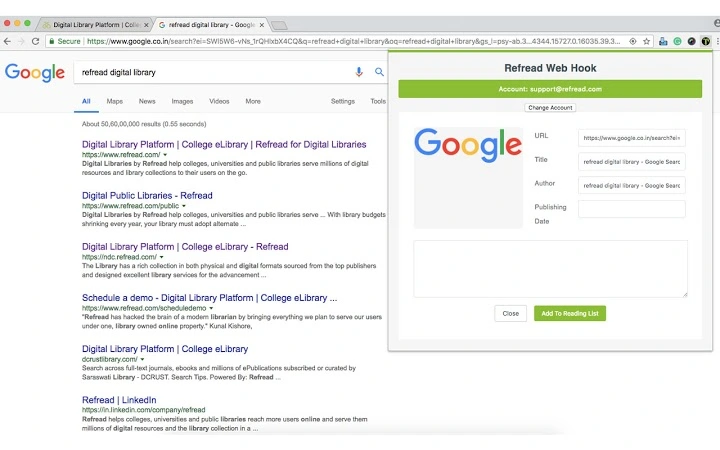
- One-Click Save to Reading List – Users can instantly save any web content by clicking the Webhook icon in the Chrome toolbar. This includes articles, webpages, Wikipedia entries, and YouTube videos relevant to a research topic.
- Seamless Integration with Refread Digital Library – All saved links are automatically added to the user’s personal Reading List within the Refread platform, ensuring centralized access and easy retrieval.
- Contextual Link Preservation – Webhook captures full URLs and metadata, preserving the exact source for accurate referencing, citation, and future verification.
- Browser-Based Accessibility – As a Chrome extension, Webhook operates directly within the browser environment, requiring no additional software installation beyond the extension itself.
- Support for Diverse Content Types – The tool is compatible with a broad range of online resources, making it suitable for multidisciplinary research across humanities, sciences, and social studies.
These capabilities streamline academic workflows by eliminating the need to manually copy and paste links into spreadsheets or notes. For example, a student writing a paper on climate change can save relevant articles and videos in real time, organizing them by topic or deadline. Faculty members can curate reading lists for courses with minimal effort. The tool also supports collaborative research by enabling shared access to curated sources through the Refread platform.
User Interface, Workflow & Performance
The Webhook interface is minimal and purpose-built, residing as an icon in the Chrome browser’s address bar. Its design prioritizes visibility and accessibility, ensuring users can activate it without disrupting their browsing experience. Navigation is intuitive: after installation and login, the button is ready to use with a single click. The workflow is streamlined—users encounter content, click the Webhook icon, and the link is saved directly to their Reading List. No additional steps or pop-up forms are required after initial authentication. Performance is expected to be efficient, given the lightweight nature of the extension (10.5 MB), though exact resource usage details were not specified. The developer did not provide performance benchmarks or CPU/RAM behavior data. Stability is assumed to be consistent with standard browser extensions, particularly when used within a single session. No reported issues with crashes or lag were mentioned. The tool does not require background processes or continuous monitoring, minimizing impact on system performance during active use.
Compatibility & System Requirements
Webhook is compatible with Windows and Mac operating systems, supporting both platforms for desktop use. The software is distributed as a Chrome extension, meaning it requires the Google Chrome browser to function. The installation size is 10.5 MB, indicating a lightweight footprint. The software version is 1.0.0, released on April 15, 2024. Exact system requirements were not listed, and no specific hardware specifications were provided. Platform compatibility information is limited to the operating systems and browser environment. Users must ensure their system meets general Chrome browser requirements, which are standard for modern desktops. The developer did not specify whether the tool works on other browsers or devices. Installation is straightforward and occurs through the Chrome Web Store, with no additional configuration needed post-installation.
Pros and Cons
Pros
- Simple, one-click method to save research links directly into a digital library
- Seamless integration with Refread Digital Library for centralized organization
- Supports diverse content types including articles, videos, and webpages
- Lightweight design with minimal system impact (10.5 MB)
- Free to use, removing cost barriers for students and educators
Cons
- Requires registration with a Refread-enabled institution or support contact
- Only compatible with Google Chrome browser
- Functionality limited to users of the Refread Digital Library platform
- No information on cross-browser or mobile compatibility
- Dependent on external platform stability and access permissions
FAQ Section
Is Webhook available for browsers other than Chrome?
Currently, Webhook is designed exclusively for Google Chrome. There is no official support for other browsers at this time.
Can I use Webhook offline?
Webhook requires an active internet connection to save links to the Refread Digital Library. Offline use is not supported.
Is the software secure?
Webhook operates within the Chrome browser environment and uses standard authentication protocols. As it integrates with a digital library platform, data is handled according to Refread’s security policies. No public details on encryption or data handling were provided.
How often does Webhook receive updates?
Updates are managed through the Chrome Web Store. The latest version, 1.0.0, was released on April 15, 2024. Automatic updates are enabled by default.
What type of license does Webhook use?
Webhook is available at no cost and does not require a license key. It is provided free of charge for use by students, faculty, and library users affiliated with Refread-enabled institutions.
Final Thoughts + CTA
Webhook delivers a focused, effective solution for academic researchers who need to capture and organize online content efficiently. Its strength lies in its simplicity and tight integration with the Refread Digital Library, offering a frictionless way to build and manage a Reading List. While its functionality is restricted to a specific ecosystem, this limitation is balanced by its reliability, lightweight design, and zero cost. The tool is ideal for students and educators within Refread-supported institutions who value time-saving, accurate citation practices, and organized research workflows. For those already using Refread’s digital library, Webhook is a valuable addition to their academic toolkit. It enhances productivity without requiring complex setup or ongoing maintenance. Download Webhook now to streamline your research process and keep all your sources in one place.
Download Webhook now







